Your prompt
Replace the brackets with your own content; leave optional ones out.
/creator-split-bar-chart
Small label on top = 〔Small label on top — small top label — max 28 chars — optional〕
Tag on the right = 〔Tag on the right — short tag — max 18 chars — optional〕
Chart title = 〔Chart title — chart title — max 30 chars〕
Unit line = 〔Unit line — what the numbers measure — max 40 chars — optional〕
Bar 1 name = 〔Bar 1 name — bar 1 name — max 9 chars〕
Bar 1 value = 〔Bar 1 value — value 1 — max 7 chars〕
Bar 2 name = 〔Bar 2 name — bar 2 name — max 9 chars〕
Bar 2 value = 〔Bar 2 value — value 2 — max 7 chars〕
Bar 3 name = 〔Bar 3 name — bar 3 name — max 9 chars〕
Bar 3 value = 〔Bar 3 value — value 3 — max 7 chars〕
Bar 4 name = 〔Bar 4 name — bar 4 name — max 9 chars〕
Bar 4 value = 〔Bar 4 value — value 4 — max 7 chars〕
Bar 5 name = 〔Bar 5 name — bar 5 name — max 9 chars〕
Bar 5 value = 〔Bar 5 value — value 5 — max 7 chars〕
Takeaway = 〔Takeaway — one-line takeaway — max 52 chars — optional〕
Color = 〔Color — ink (near-black, mint) / paper (warm paper, coral) / sky (pale blue, cobalt) — optional〕
Brand color = 〔Brand color — #RRGGBB — optional〕
Video shape = 〔Video shape — landscape 16:9 (YouTube, screens) / vertical 9:16 (Reels, Shorts, TikTok) / square 1:1 / 4:5 (Instagram feed) — optional〕
Your talking-head clip = 〔Your talking-head clip — your talking-head video or photo〕
Video size = 〔Video size — 1080p / 4K — optional〕
Not sure? Say: show me an example first
Example
/creator-split-bar-chart
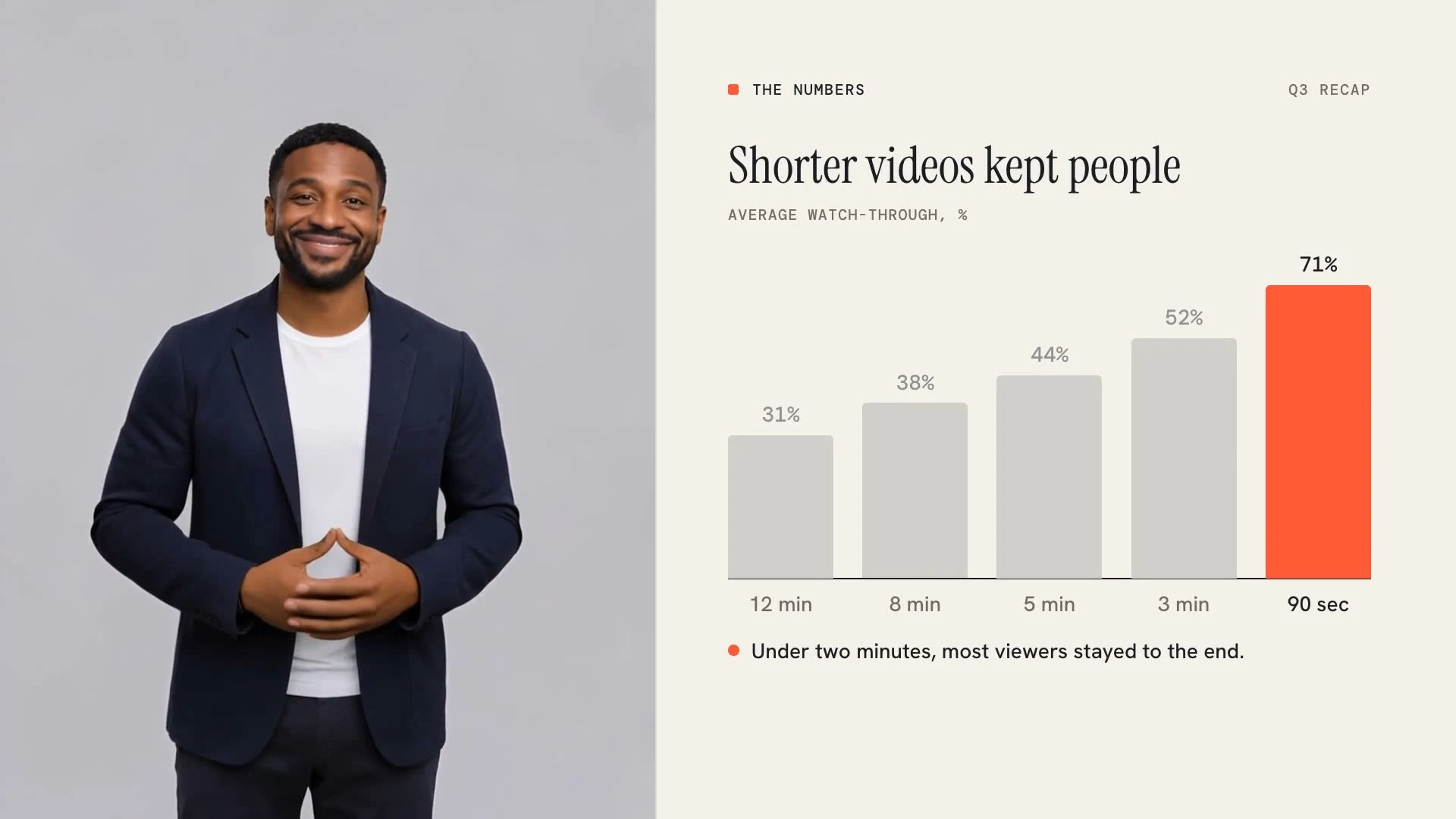
Small label on top = The numbers
Tag on the right = Q3 recap
Chart title = Shorter videos kept people
Unit line = Average watch-through, %
Bar 1 name = 12 min
Bar 1 value = 31%
Bar 2 name = 8 min
Bar 2 value = 38%
Bar 3 name = 5 min
Bar 3 value = 44%
Bar 4 name = 3 min
Bar 4 value = 52%
Bar 5 name = 90 sec
Bar 5 value = 71%
Takeaway = Under two minutes, most viewers stayed to the end.
Color = paper-coral
Brand color = #1E3A8A
Video shape = 16:9
Your talking-head clip = the sample presenter photo in the pack
Video size = 4K
Bar Chart Focus
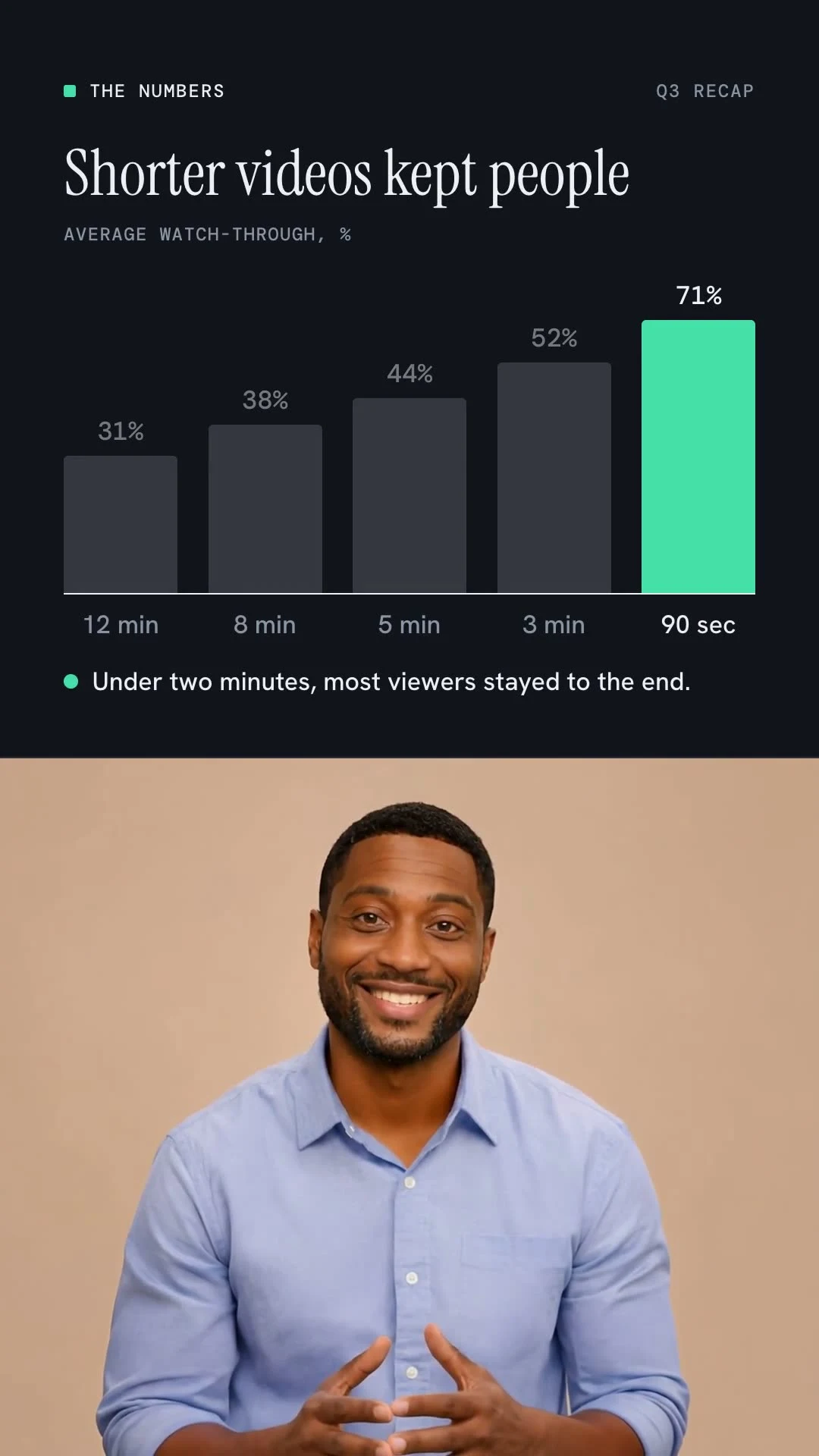
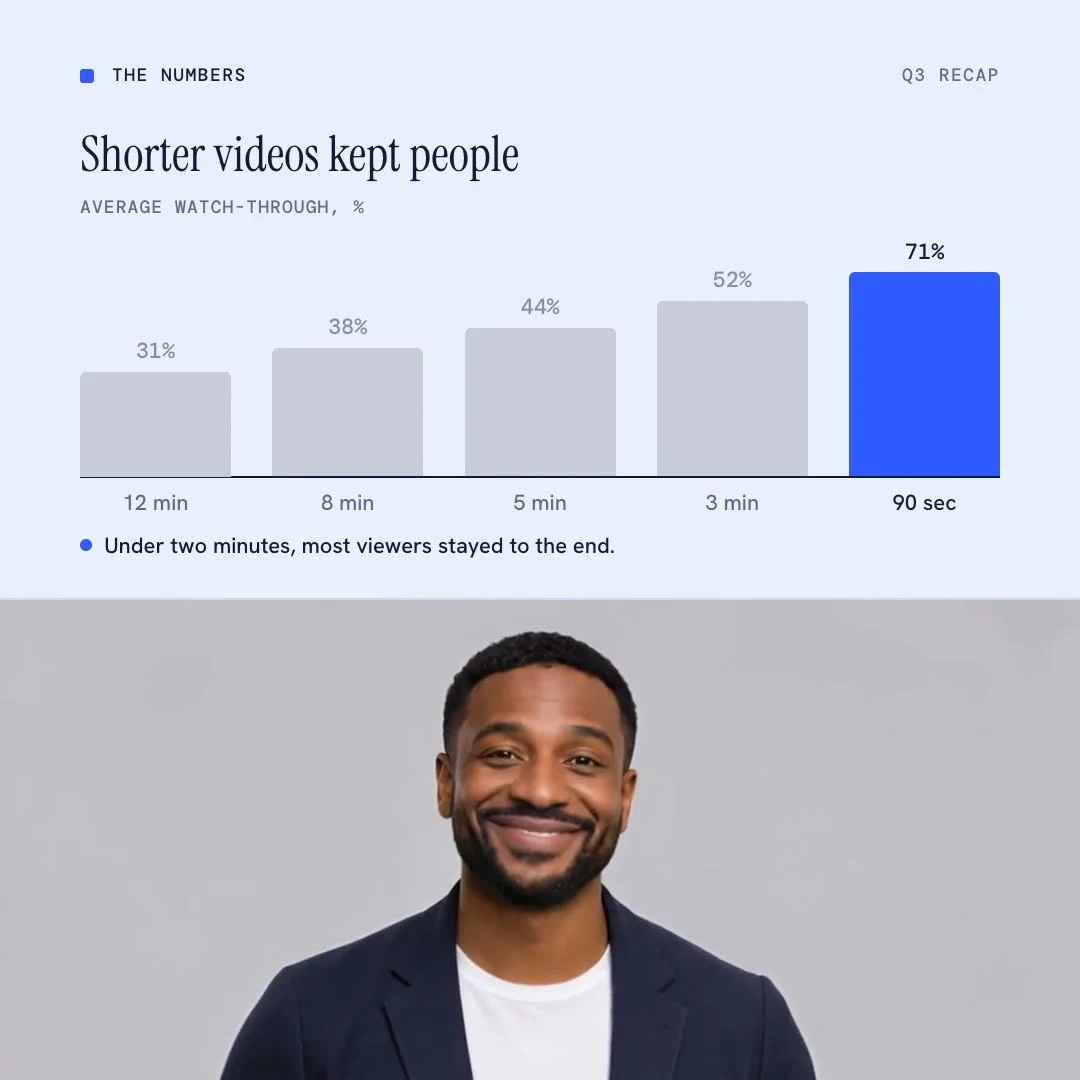
An 8-second talking-head insert: the presenter on one side, five bars on the other that grow while their values count up, then the rest step back and your focus bar takes the accent colour before a one-line takeaway lands. Use your photo or your own footage with its sound, pick a palette or brand colour and render 16:9, 9:16, 1:1 or 4:5 in 4K locally.
How it works
- Install the skill · Install guides
- Run your request ·
/creator-split-bar-chart - Review the result
Review the workflow in SKILL.md and use the bundled commands below.
node -vnode scripts/check-setup.mjsnode scripts/create.mjs --out ./demonode scripts/render.mjs ./demo --output ./demo.mp4node scripts/create.mjs --out ./my-scene --data content.json --aspect 16:9 --theme paper-coral --host ./me.jpgnode scripts/render.mjs ./my-scene --check
Workspace
references/defaults.jsonreferences/fill-in.jsonreferences/layout-rules.jsonreferences/project/index.htmlscripts/check-setup.mjsscripts/compose.mjsscripts/create.mjsscripts/host-frame.mjs
What you get
- An editable 8-second chart scene in 16:9, 9:16, 1:1 and 4:5, each with its own layout, all labels and values in named slots
- 4K MP4 by default (or 1080p), stills of any moment, and a script that puts your own talking-head footage and voice into the presenter panel
- Three palettes plus any brand colour, counters that always end on your exact values, a text-fit check and a visual review checklist
Requirements
- Required · Node.js 22 or newer
- Required · Google Chrome, Chromium or Microsoft Edge
- Required · FFmpeg
- Optional · HyperFrames CLI (via npx)
Tips
Five bars grow and count up beside the presenter, then the one that matters lights up.
Make the same chart in 9:16 with the ink-mint palette and focus on 3 min instead
Put my recording talk.mp4 into the presenter panel starting at 2:10
Before you start
| You provide |
|
|---|---|
| Dependencies |
|
| External costs | No external service cost |
| Last updated | v1.0.2 · |
No additional scope beyond the supplied workflow.



























































































