Your prompt
Replace the brackets with your own content; leave optional ones out.
/data-goal-fill
Company or team name = 〔Company or team name — your company or team — max 20 chars〕
Report period = 〔Report period — report period — max 24 chars — optional〕
Title = 〔Title — what is measured, over what period — max 40 chars〕
Word before each target = 〔Word before each target — Target / Goal / Plan — max 10 chars — optional〕
One-line takeaway = 〔One-line takeaway — your one-sentence conclusion — max 60 chars〕
Source note = 〔Source note — where the numbers come from — max 72 chars — optional〕
Color = 〔Color — dark amber (graphite, amber) / dark blue (ink, cobalt) / light (paper, cobalt) — optional〕
Brand color = 〔Brand color — #RRGGBB — optional〕
Video shape = 〔Video shape — landscape 16:9 (YouTube, screens) / vertical 9:16 (Reels, Shorts, TikTok) / square 1:1 / 4:5 (Instagram feed) — optional〕
The goals (2-4) = 〔The goals (2-4) — 2-4 goals: name, actual, target〕
Video size = 〔Video size — 1080p / 4K — optional〕
Not sure? Say: show me an example first
Example
/data-goal-fill
Company or team name = Fernhollow
Report period = Q3 2026
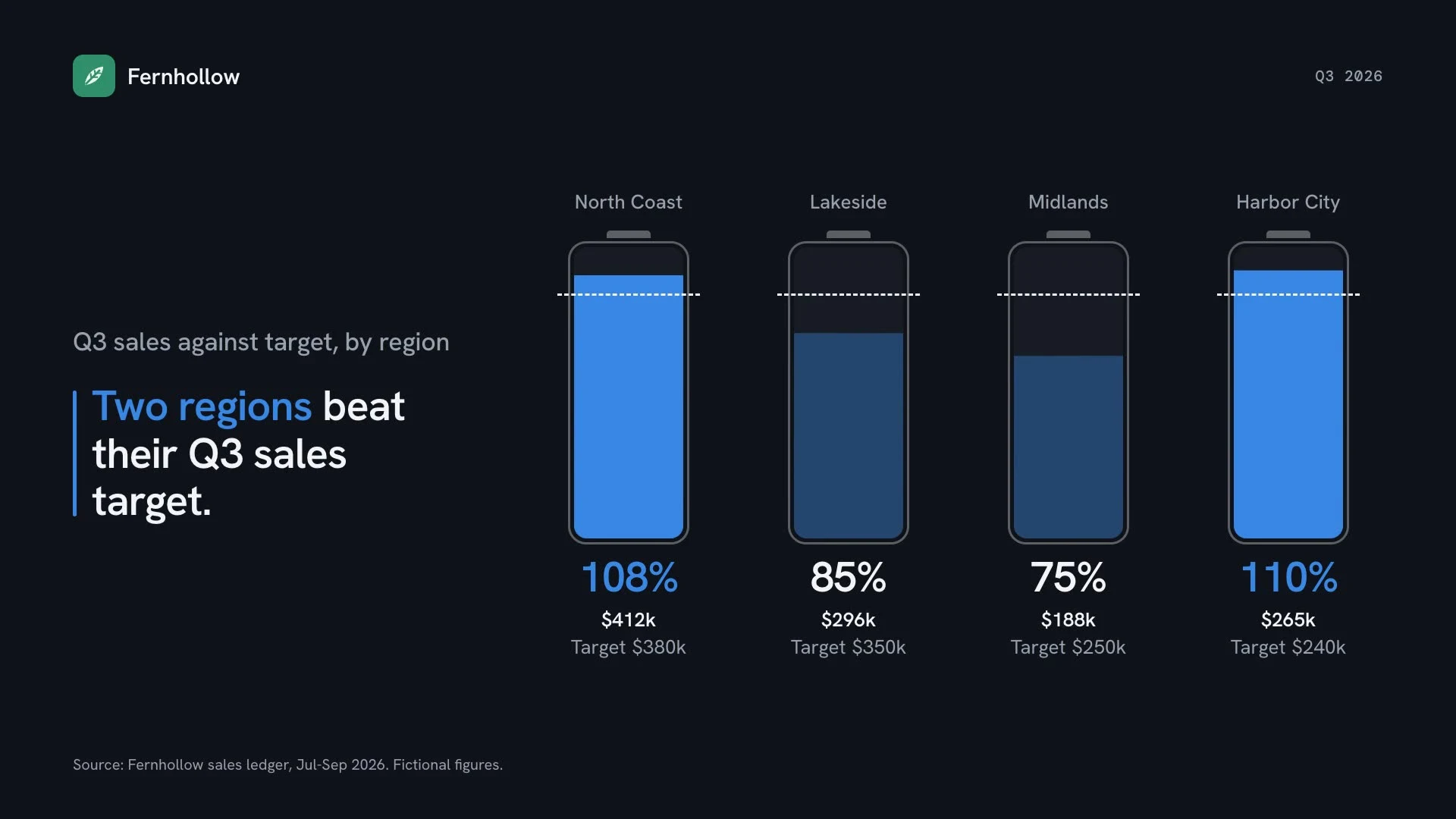
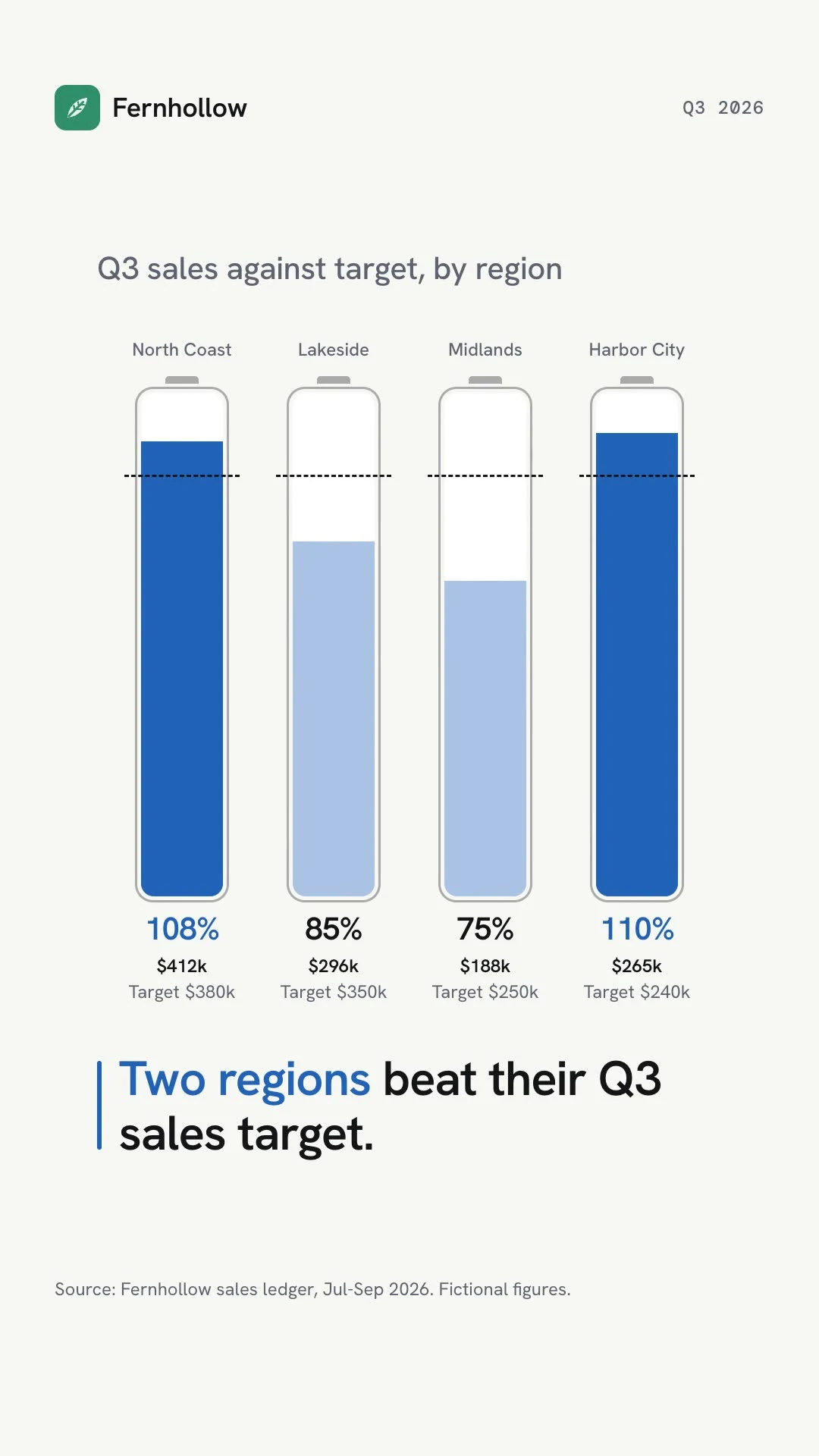
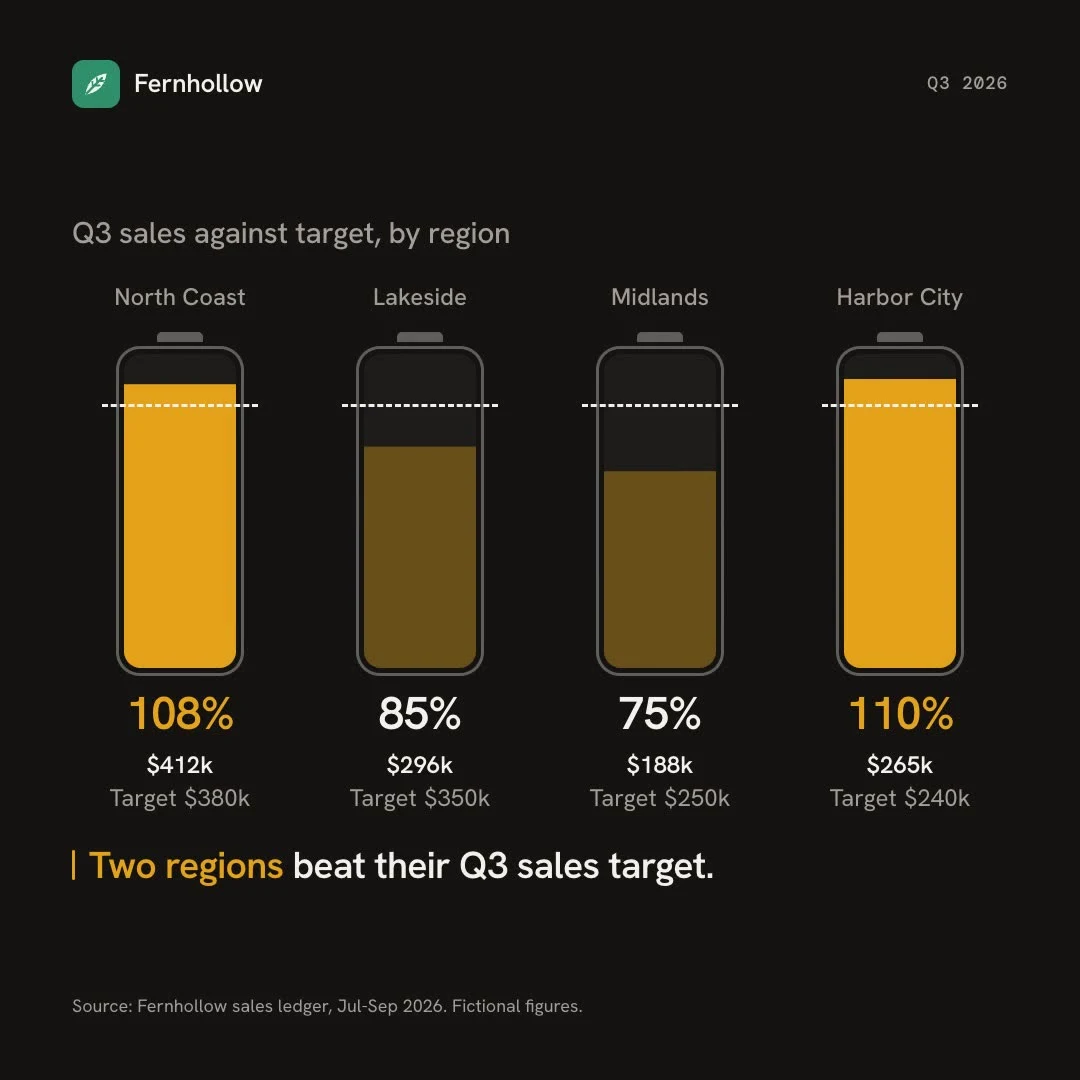
Title = Q3 sales against target, by region
Word before each target = Target
One-line takeaway = [[Two regions]] beat their Q3 sales target.
Source note = Source: Fernhollow sales ledger, Jul-Sep 2026. Fictional figures.
Color = ink-cobalt
Brand color = #1E3A8A
Video shape = 16:9
The goals (2-4) = North Coast 412 of 380, Lakeside 296 of 350, Midlands 188 of 250, Harbor City 265 of 240 (in $k)
Video size = 4k
Goal Fill Gauges
An 8-second clip for progress against goals: two to four battery-shaped tanks fill with a wavy liquid to actual divided by target, a dashed line marks 100 %, the percentage and the actual figure count up, goals that were hit turn to the accent colour and over-achievers rise above the line. Add your numbers, title, source note and logo, pick a palette and render 16:9, 9:16, 1:1 or 4:5 in 4K.
How it works
- Install the skill · Install guides
- Run your request ·
/data-goal-fill - Review the result
Review the workflow in SKILL.md and use the bundled commands below.
node -vnode scripts/check-setup.mjsnode scripts/create.mjs --out ./demonode scripts/render.mjs ./demo --output ./demo.mp4node scripts/create.mjs --out ./my-scene --data content.json --logo ./logo.svg --aspect 16:9 --theme ink-cobaltnode scripts/render.mjs ./my-scene --check
Workspace
references/defaults.jsonreferences/fill-in.jsonreferences/layout-rules.jsonreferences/project/index.htmlscripts/check-setup.mjsscripts/create.mjsscripts/hyperframes.mjsscripts/layout-guard.mjs
What you get
- An editable 8-second goal clip in 16:9, 9:16, 1:1 and 4:5, each with its own layout; two to four tanks from your numbers
- Fill levels, percentages and goal-hit colours computed from your actual and target figures; your unit, decimals, thousands separator and compact format (12.4k / 3.1M) applied to every number
- 4K MP4 by default (or 1080p), stills of any moment, three palettes plus any brand colour, a text-fit and layout check and a visual review checklist
Requirements
- Required · Node.js 22 or newer
- Required · Google Chrome, Chromium or Microsoft Edge
- Required · FFmpeg
- Optional · HyperFrames CLI (via npx)
Tips
Battery-shaped tanks fill to actual vs target, with a goal line and the % counting up.
Make the same clip in 16:9 with the graphite-amber palette and highlight Partners
Write the target word as Goal and switch the accent to #12B886
Before you start
| You provide |
|
|---|---|
| Dependencies |
|
| External costs | No external service cost |
| Last updated | v1.0.2 · |
No additional scope beyond the supplied workflow.



























































































